When we launched CedarDB Cloud, we teased a dedicated space to give your agents safe access to your data.
Today we’re launching CedarDB Cloud’s integrated MCP server. Connect Claude, Claude Code, or ChatGPT once, and ask about your data, build dashboards, or write data-driven applications in plain language directly from your web browser.
Your agents are most impactful when they get access and can react to your real data. But that’s also where a wrong query, prompt injection, or hallucination does the most damage. So we built the integration around a simple rule:
Your agents get their own database user
… and we don’t hide that user from you.
Every request your agent sends is evaluated as if it was sent by that user. By default, this user has access to nothing. On your project’s Agents tab, you can decide per table what it may do: No access at all, read, or write.
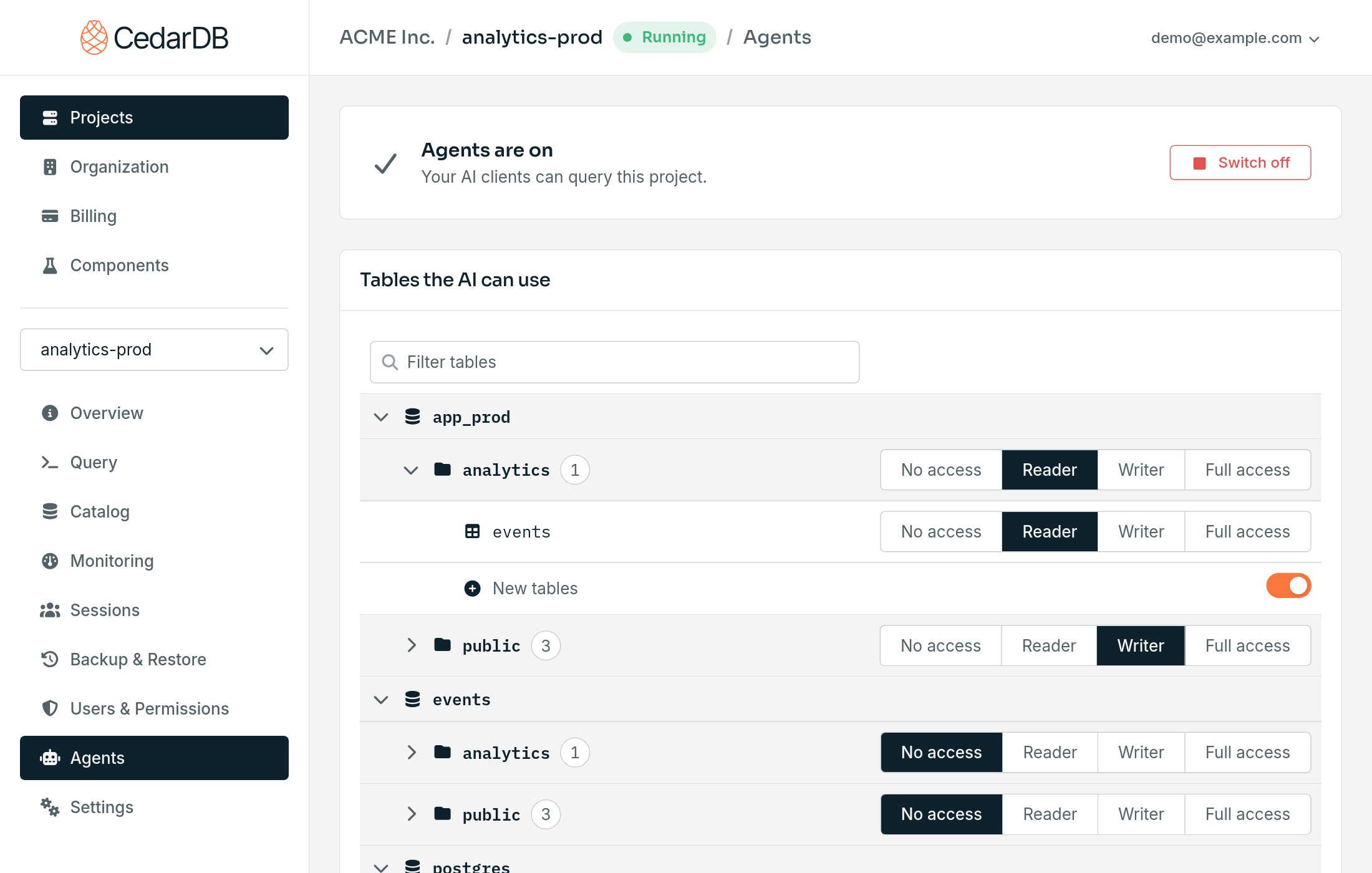
CedarDB checks these permissions on every single query. No prompt, injected or not, can talk an agent to do something you don’t want it to do.
Need finer control? The agent user is a regular database role called cedar_mcp, so you can use
GRANT to set exactly what it may do,
and row-level security to limit which rows it sees.
For example, you can let agents file support tickets without reading anyone else’s, or only show them orders from one region:
-- Agents can add tickets, but not read existing ones
REVOKE ALL ON support_tickets FROM cedar_mcp;
GRANT INSERT ON support_tickets TO cedar_mcp;

-- Agents only see orders from the EU
ALTER TABLE orders ENABLE ROW LEVEL SECURITY;
CREATE POLICY agents_eu_only ON orders TO cedar_mcp USING (region = 'EU');
And if you want agents gone, switch them off for the project or disconnect a single client.
What Your Agents Can Do
Answer questions. Agents find their way around an unfamiliar schema and answer questions that would take you several queries.
Build dashboards. Claude turns query results into charts and interactive dashboards you can share, and they stay connected to your live data.
Write code against your schema. Claude Code writes application code, migrations, and tests that match your actual tables, and checks its queries against your data while it works.
Get started
- On your project’s Agents tab, select Switch on and choose the tables agents may access.
- Add
https://api.app.cedardb.cloud/mcpas a connector in Claude, or as an MCP server in Claude Code or ChatGPT. - Sign in with your CedarDB Cloud account, allow the connection, and start asking.
Our docs walk you through each client step by step.
New to CedarDB Cloud? Your first project is free for 30 days.