Can Your Data Stack Run DOOM?
TL;DR
We ran a multiplayer DOOM server in pure SQL on different data stack architectures, recorded nice videos, and measured what breaks first.
- Click here to go directly to the benchmark page (with videos).
- Here is a video of CedarDB being “DOOMbench”-ed:
Why DOOM?
Pedantic note: The original DOOMQL uses raycasting, not BSP trees, making it technically more Wolfenstein than DOOM as some people pointed out.
Last year, we published DOOMQL: a multiplayer DOOM-like game running entirely inside SQL, using recursive CTEs for raycasting and a real client-server architecture where players connect directly to the database. We were very excited when it hit the front page of Hacker News. DOOMBench builds on DOOMQL and turns it into a stress-test for different data stacks. Latency numbers and throughput charts are easy to report but hard to feel. A video of a database struggling to render a video game frame can be felt instantly!
Let’s look at the three dimensions DOOMQL covers:
- Raw analytical performance: DOOMQL uses recursive CTEs to render a game world in ASCII-art using raycasting. That’s as number-crunchy as SQL gets! Some might interject that this is not a workload representative of the real world, to which I reply: Might be true, but there’s precedence.
- Transaction Processing: DOOMQL uses a client-server architecture. Clients connect directly to the database and insert their inputs into an
inputstable: WASD to move, X to shoot. That’s not going to be a lot of transactions (think: 10 players sending an input every 200 ms each -> 50 transactions per second), but latency is a big issue here. If you’ve ever played a multiplayer shooter with a high ping, you understand. Furthermore, there’s also a game loop the server has to run multiple times a second. This can reach from 100 ticks per minute (Runescape) to 128 ticks per second (Valorant). - Atomicity: Nothing feels worse than being shot by a player who was already dead on your screen. Good database systems can execute transactions in an atomic fashion. Either everything applies or nothing: There cannot be a player that has 0 or less hitpoints but hasn’t been killed and respawned yet. This is not really a metric to measure: It either applies, or it doesn’t. Fortunately, nearly all serious databases implement such ACID guarantees nowadays.
The interesting part is that it’s very hard for your data stack to be good at both analytical and transactional processing. Analytics wants to crunch a lot of data and is usually bandwidth-bound (memory, disk, caches). Transaction processing wants writes to feel snappy and is usually latency-bound. Both approaches traditionally use different data layouts, data structures, and system architecture. Let’s explore them in the context of DOOM!
What does a database running DOOM look like?
Let’s use Postgres as an example. Here’s a video of it running DOOMbench:
Let’s go over what we see:
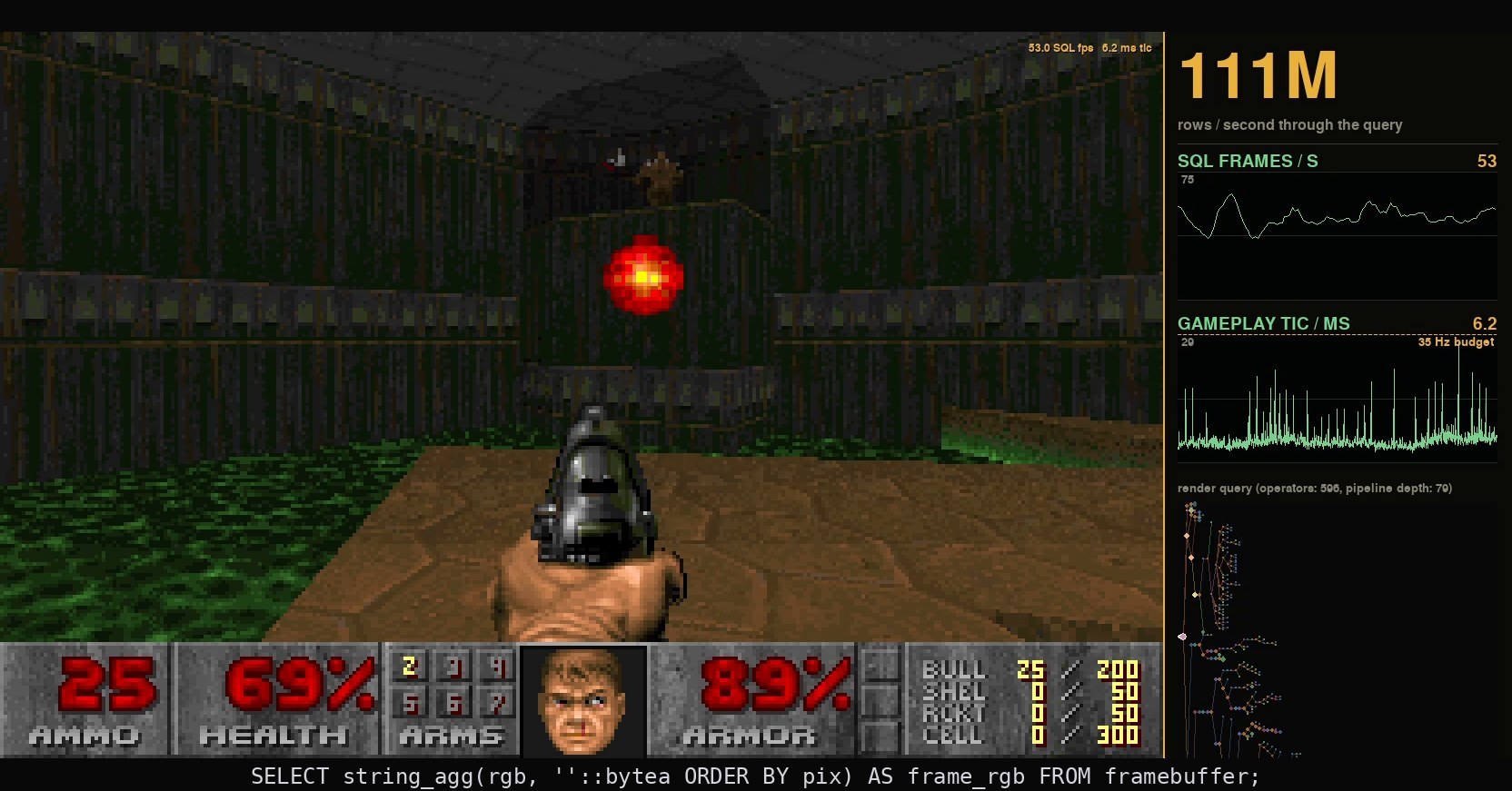
- The main view on the left shows the player’s view: The Raycasted game view itself, a minimap with the player’s sight cone, and a score screen including player health, ammo and kill count.
- Right of that is a minimap of the world state. It’s the state Postgres is currently in, i.e. not the view rendered to the client, but the state of the database at the current tick.
- Below that, we see the player input, as well as some performance numbers: the server tick rate and FPS, both current and as historic chart.
So how does data flow through the whole system? Let’s look at what has to happen for a new view to be rendered:
1. Inputs
The player presses ‘W’ which appends a new row into the inputs table: insert into inputs(player_id, action, timestamp) values (47, 'W', now()).
2. Game tick
The next game tick will then read that row, update the player position (as long as the player isn’t dead, the move is blocked by walls, etc…). We limit the server tick rate to 35 ticks per second (same as the original DOOM). Ticks and input are processed in lockstep.
3. Rendering
Clients can request a frame by querying a view that does all the raycasting behind the scenes on demand: select full_row from frames_by_row where player_id = 47 order by f.row asc (see here)
The rendering loop is decoupled from the game tick loop (game design 101), leading to a true mixed workload: Every client wants to maximize its own FPS (no VSYNC here, analytical workload), while the server also must be able to still process all the inputs at 35 ticks per second (transactional workload), while players continue to happily send their inputs whenever they please (transactional workload #2).
Since rendering is very(!) expensive and the game tick loop is decoupled from the rendering loop, the player’s view can get heavily out of sync with the game state.
You can see this with Postgres above: While it can process about 10 ticks per second, rendering the view takes multiple seconds. The player makes a smooth 360 degree turn, as visible in the game state, but the output never catches up. While the server already knows what happened to you, you don’t! I think we can all agree that a Counter-Strike pro wouldn’t call this playable.
OLAP: Let’s do everything in a data lake!
Okay, while Postgres is a battle-tested database system, it doesn’t seem to be a fit for our workload since it’s just not fast enough to push enough frames per second. Let’s go with a pure OLAP system instead! They are purpose-built to answer complex analytical queries, so they should push a lot of FPS, right?
True, but unfortunately they are really bad at transactions and usually don’t have a way to do live transaction processing at all. Where’s the value in rendering a lot of frames if your input isn’t processed?
There are two ways to get around this limitation: Two systems with an ETL pipeline in between (Extract-Transform-Load) or what I come to lovingly call the nesting doll approach. Let’s look at both approaches!
ETL
The concept is pretty simple: Let’s use a system that’s really good at transaction processing, and a system that is really good at analytical processing and insert a pipeline in the middle replicating the data (a so-called ETL pipeline). The transactional system can focus on processing all the player inputs and running the game loop, the analytical system can push the FPS.
Here’s such a set up. It uses Postgres as transactional system and DuckDB as analytical system. A simple CDC (Change-Data-Capture) loop runs once a second and copies over all tables from Postgres to DuckDB. Here’s the result:
Doesn’t look much better, right?
But it is, in fact, much better! If you look at the chart, you see that DuckDB pushes a respectable 10 FPS (compared to the 0.3 of Postgres). But since the game state visible to DuckDB only updates once a second, 9 out of 10 frames just render the same view!
This system split is awesome for raw analytical performance but kind of useless if you need a tight feedback loop.
The Nesting Doll Approach
Having a second system and an ETL pipeline sucks: Apart from the replication lag we just encountered, you also have to maintain multiple systems and the pipeline in-between. There is another approach, though: If everyone really likes using Postgres, but Postgres is not fast enough on analytical workloads, why not just co-locate a fast analytical engine inside your Postgres?
One such approach is pg_clickhouse which we already discussed in a previous post on this blog. It provides access to the ClickHouse database engine from inside Postgres and can push table scans to the far more capable ClickHouse analytical engine. Here’s DOOMQL on pg_clickhouse:
As you can see, it shows more or less the same performance as Postgres. Improving table scan performance with modern engines is great, but in the end it’s still the Postgres query optimizer and execution engine which are the bottleneck. This is especially true for DOOMQL where tables are pretty small (so no need for fast table scans), but the queries themselves are very complex.
HTAP is the holy grail?
So far, we’ve seen: Postgres handling transactions, but being unable to push frames. DuckDB behind an ETL pipeline pushes frames but renders stale state. Bolting a fast analytical engine onto Postgres doesn’t help because the bottleneck is query executor (and its execution model), not the bare table scans.
So what if your database was just good at both? That’s the premise of HTAP (Hybrid Transactional/Analytical Processing). A database built in such a way that it can handle writes with low latency and run complex analytical queries on the same data in parallel, without an ETL pipeline. So no replication lag, stale reads, and especially no second system and data pipeline to maintain.
But if that’s so desirable, why aren’t all systems like that? For most of database history, the hardware made you pick “either/or”. OLTP systems were designed around the catastrophically bad random I/O of spinning disks. To make sure that a newly inserted record touched as few different places on disk as possible, OLTP systems are usually row-oriented and new rows are just appended.
OLAP systems obviously have to work with the same disk limitations, but want to scan a lot of data in as few reads as possible. Since they were usually bottlenecked by the measly throughput of an HDD, they try to read as little as possible, making extensive use of compression schemes and structuring their data layout into columns. A query usually doesn’t touch all fields of a record (I’m not interested in the player’s password if I just want to find out their position on the map), this massively reduces the amount of data to be scanned. Unfortunately, this is terrible for OLTP: Adding a new row now means I have to update all its columns which are spread all over the disk.
Nowadays, entire companies exist just to move data between OLTP and OLAP systems. But the foundational assumptions of those systems don’t hold anymore: A single server can have dozens of cores and hundreds of GiB of RAM, which is often enough to keep your entire hot dataset in main memory. Modern NVMe SSDs can do hundreds of thousands of random IOPS. So, the hardware constraint that forced specialization is mostly gone, but most database architectures haven’t caught up. They are still organized around the tradeoffs of the 90’s and 00’s. CedarDB is built from scratch for the new reality: The storage layer, query optimizer, and execution engine are all designed to handle both workloads natively. Instead of bolting an analytical engine onto a transactional one or vice versa, CedarDB follows one coherent architecture that assumes fast storage, abundant DRAM, and many cores.
But enough theory, let’s see CedarDB in action:
The difference is immediately visible. CedarDB can push ~30 FPS at 30 ticks per second without replication lag: Each frame shows the current system state. DOOMbench records a median lag of 44 milliseconds, meaning it takes just 44 milliseconds for a keypress to lead to an observable outcome. Still not enough for a counterstrike pro, but enough to actually play the game!
Is it a contrived workload? Absolutely! But the underlying pattern (make observations on fresh data) shows up everywhere. Take for example dashboards, interactive analytics, or AI agents acting on their own decisions.
The DOOMbench web page
But enough about the videos. Head over to cedardb.com/doombench for the full result table, or keep reading for a summary.
DOOMbench measures four things:
- Tickrate: This is a pure OLTP measurement without rendering any frames. Four players move around and shoot while the server processes game ticks as fast as possible. How fast can your database run the game loop?
- Static FPS: This is a pure OLAP measurement without any movement or ticks. Four players query their rendered view as fast as possible. This is raw analytical query throughput. We sum up and report the FPS of all four clients.
- Median Lag: The metric every eSports gamer cares about. Time from button press to the rendered view reflecting that input. This captures OLTP performance, OLAP performance and replication lag in a single number.
- DOOMscore: The HTAP benchmark. Four clients playing the actual game with the game loop ticking at 35 Hz (original DOOM tick rate). How many combined frames per second can the database render while keeping up with the game loop? Systems that can’t sustain 35 ticks per second get penalized proportionally: If you only manage half the tick rate, your DOOMscore halves too.
Each system runs the same DOOMQL codebase on the same hardware. Since some systems (CockroachDB, DuckDB) have slight syntax deviations, DOOMbench allows you to declare database-specific SQL overrides. Apart from the four numbers above, DOOMbench also records a video replay of the same scene for every database which you can watch.
DOOMbench is open source. If you want to add additional systems, feel free to open a PR! DOOMbench currently only works with Postgres-compatible systems, but we’d like to add other systems as well.
Should I care?
About the benchmark?
Probably not! Every vendor pushes their own benchmark where they are the best to the surprise of absolutely no one. This benchmark isn’t different: It uses very obscure and arcane SQL features like recursion and very involved string manipulation. But it generates videos that make the tradeoffs in your data stack instantly visible. That has to account for something, right?
About HTAP?
Depends on your workload. Plenty of workloads are fine with stale data. If you’re reading the report after having a coffee anyway, you probably don’t care if it’s five minutes out of date. If you want to make decisions without a human in the loop, or use your database for interactive workloads (you, your customer, or your AI agent changes some parameter and expect an instant result), HTAP is a game changer! Or if you want to play DOOM, I guess…
What’s next?
We’re open-sourcing DOOMbench. Missing a system? Unhappy with our methodology? Open a pull request! I’m also working on a BSP tree implementation in recursive SQL, so we’ll hopefully have a real DOOM inside SQL soon.
If you want to run DOOMbench yourself, you can check out the code here. All database systems are dockerized and should work out of the box. Want to try out CedarDB in your own stack? Get started here or get in touch