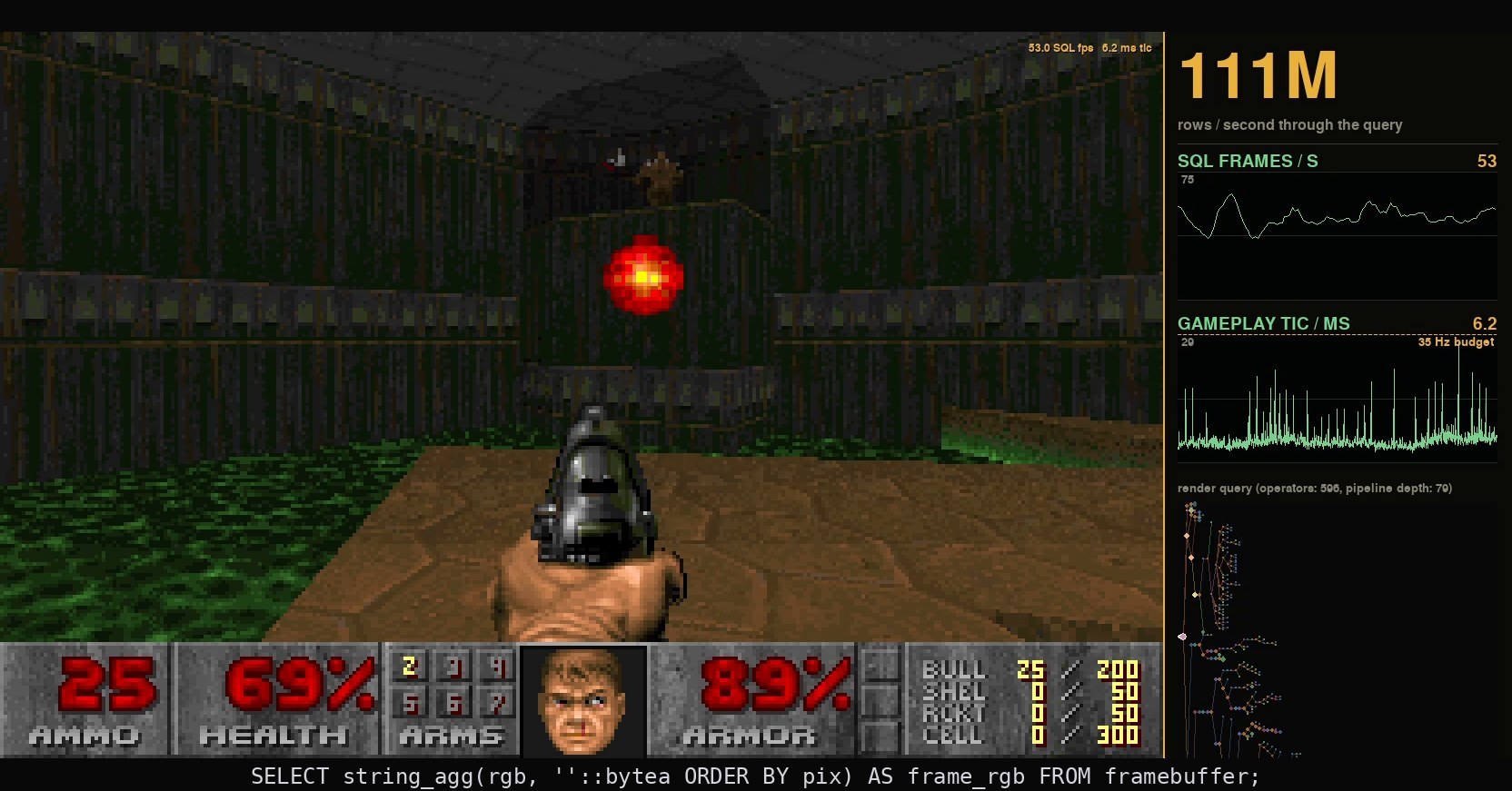
Stock charts are everywhere. News outlets constantly cover the latest events at the stock exchange. More than one movie included eccentric stock analysts or chaotic trading floors. With the rising popularity of neobrokers and trading apps, you likely even see stock charts during your lunch break or on your commute.
Turns out, they also make for an excellent demo for database systems, and we used that recently for our TechCrunch Startup Battlefield’s Top 20 presentation. We’ll use that demo to show what makes a stock exchange a compelling use case to push database systems to their limit, and see how CedarDB is able to run an entire stock exchange on a laptop.
Why Stock Data?
Without knowing every intricate detail of stock data, it quickly becomes clear that its analysis has three strong requirements that make it both interesting and challenging for database systems:
- Data Freshness: Working with yesterday’s stale data doesn’t make sense. Otherwise, you might miss the latest GameStop swing or an index flash crash.
- Fast Results: The freshest data is of no use if it takes you minutes to analyze it. You might catch overnight shifts, but you are late to intraday swings.
- Complex Queries: You not only want to see specific events, but need filters for stock tickers, aggregations over time, or prices calculated via a join over orders and executions.
While you probably don’t run a stock exchange yourself, these requirements still might be very familiar to you. In our conversations, we’ve heard similar requirements across a wide range of use cases in e-commerce, fleet management, or SaaS offerings. Let us look at what makes delivering all of them at the same time so challenging.
What is the workload?
Simply put, a stock exchange’s sole purpose is to facilitate the exchange of stocks, i.e., allow traders to buy and sell them. Market participants indicate their intent by placing a buy or sell order for a certain amount of company’s stock at a fixed price. Participants can update orders by placing another order or cancel them completely. Once a sell order bids the stock at a price lower than or equal to another order’s ask, they execute. Together, this results in a continuous stream of orders, executions, and cancellations. For a more detailed introduction, read our docs page1.

Stock exchange data comes at different levels, and only a full order book (Level III) like above completes the stock market’s schema and is considered the industry’s gold standard. At Level I, only the lowest open ASK price and highest BID price per stock and time span are tracked. Level II adds aggregated order quantities for each price point within a narrow span around the midpoint. At Level III, the order book tracks all active orders individually. New orders are inserted as an individual rows, updated orders replace old rows, and cancellations and executions delete them. The Level III workload of inserts, updates, and deletes is where traditional time-series databases, highly optimized for append-only streams of timestamped values, fall short.
Data Ingestion - Transactional Workload
To showcase the workload as close to reality as possible, we replay the trading data of January 30, 2020, of a prominent US stock exchange in real time. It runs from market open at 9:30am until market close at 4:00pm. For our demo, our client inserts simultaneously into both CedarDB and PostgreSQL with single-row inserts, updates, and deletes, committing every 100ms. Once the inserter reaches the end of the trading day, it clears the tables and starts all over again from the beginning.
This gives us an average event rate of 20k/s, with spikes up to 70k/s. The number of executed SQL statements is exactly twice that. Each insert into orders, executions, or cancellations tables is accompanied by an update to the order book table.
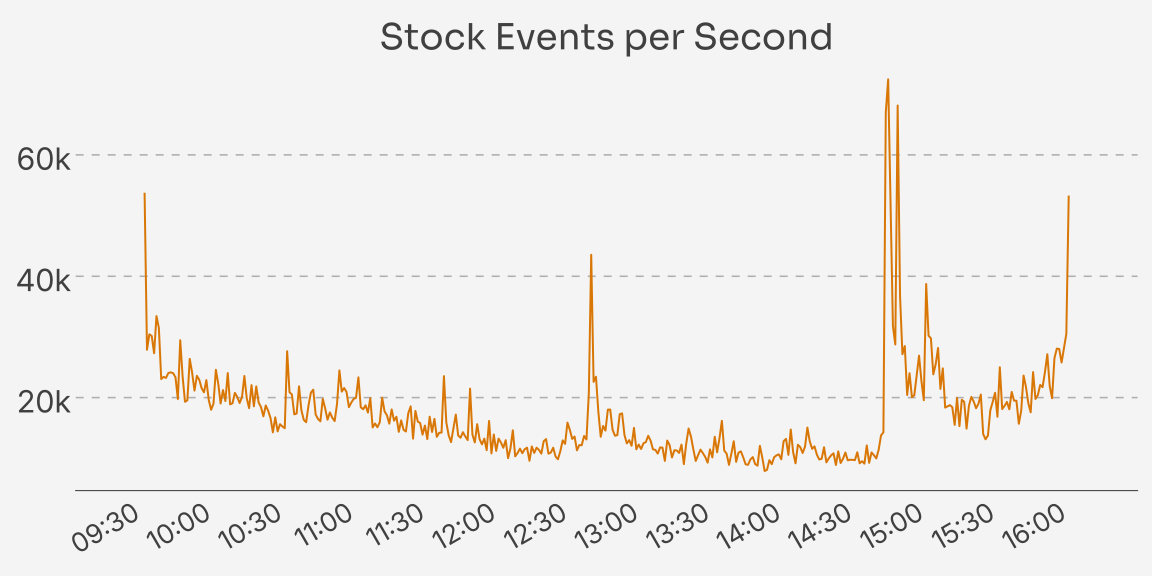
Attentive readers may have noticed that the example data falls within a globally significant time range. On January 30, 2020, the WHO (World Health Organization) declared the coronavirus outbreak a public health emergency of international concern (PHEIC)2. Beyond severely affecting our personal lives, the global pandemic also significantly influenced the world economy. This is clearly visible in the spikiness of the workload, with many events occurring around the time of WHO statements and briefings.
Dashboard Panels - Analytical Workload
We didn’t want to run a workload of hand-selected queries only, as this rarely happens in the real world. So instead, we let users explore various stock tickers across different time ranges in our demo. We built the interactive data visualization using five Grafana panels that query the databases directly, refreshing each panel every 500ms if the database system permits. We will describe each panel in a bit more detail and explain how it might relate to your workload. The SQL for each can be found in the appendix.
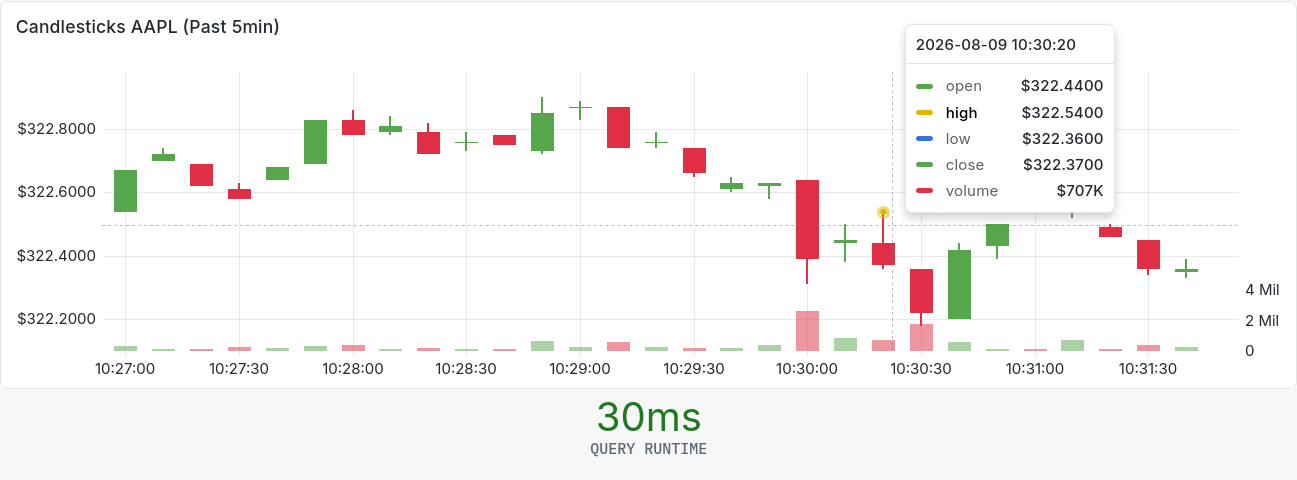
Candlestick Charts: This kind of chart is the prototypical visualization of any price analysis. Rumored to have been invented by Japanese rice traders in the 18th century, it has become a well-known symbol for stock price movements. While it looks fairly complex at first glance, the data is easy to grasp. A single candlestick is made from four data points and represents 10s of market data. The highest and lowest price during the time interval are marked by so-called shadows. The colored body spans from the open price to the close price for the displayed time interval. Rising prices (open < close) are indicated by green color, falling prices (vice versa) by a red body. Additionally, right above the x-axis, the order volume for each 10s interval is displayed.
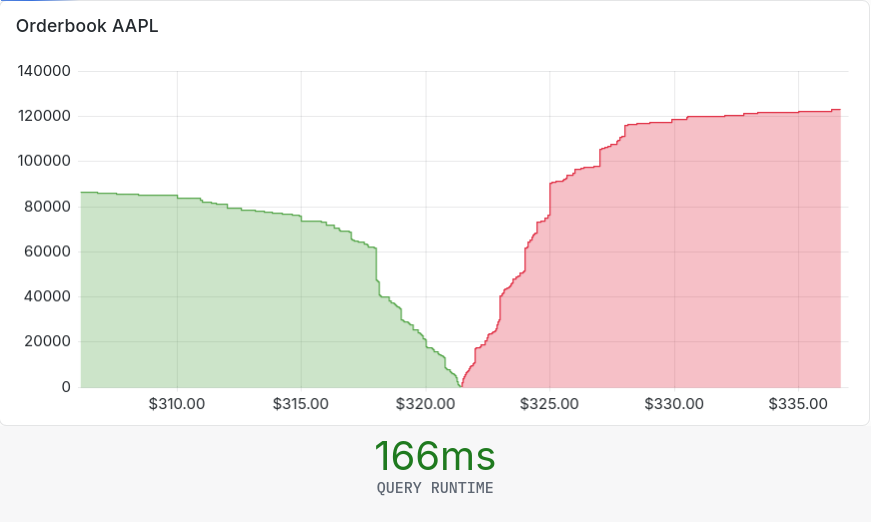
Order Book: The order book panel juxtaposes the volume of all open asks (green) and bids (red) for a given stock. It sums the quantities of all orders at each price level, creating the characteristic step shape. Traders use this information to spot imbalances between asks and bids, or resistance points where market participants are more willing to sell or buy.
Top-K: The demo includes two Top-K panels. The first calculates the 100 largest trades by volume (price x quantity). The second displays the 10 stocks with the most executions during the selected time span.
Event Count: Lastly, the gauges indicate the activity on the stock exchange. We compute the count of new orders, updated orders, executions, and cancellations that were processed in the past second.
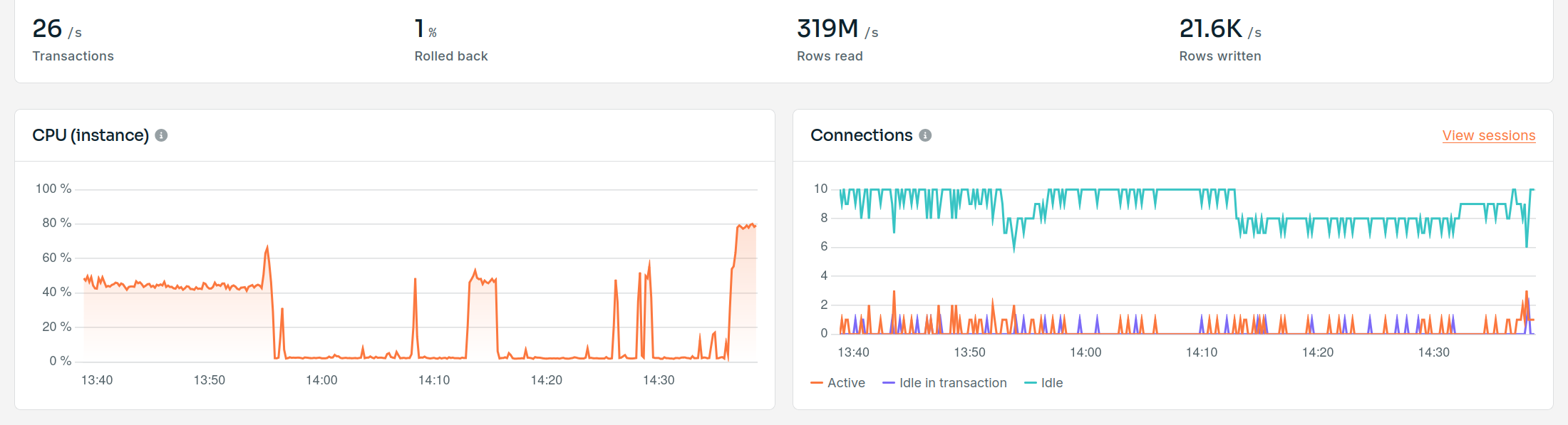
Both workloads run concurrently on the same tables, but they put very different levels of stress on the database. You can see this in the monitoring tab of the CedarDB instance powering our demo. While only the inserter is running, CPU load stays at a few percent, even with more than 20k rows written per second. As soon as the dashboard panels start refreshing, CPU load jumps significantly as the instance needs to process hundreds of millions of rows per second. Keeping up with tens of thousands of transactional writes is easy for most modern systems. Running complex analytics on top of constantly changing data is where the real work happens.
What makes CedarDB excel at real-time analytics?
Real-time analytics is a popular notion in the database landscape, but it has many different definitions. Many systems partially meet the requirements above, but few satisfy all of them, as CedarDB does.
Transactional (OLTP) systems provide data freshness, but struggle with complex concurrent analytics. Analytical (OLAP) systems, by contrast, can deliver fast query results but rely on ETL pipelines for data ingestion. Their data freshness delays often exceed seconds, if not minutes. Time-series databases reduce both ingestion time and query latency, but their analytical capabilities quickly hit limits when queries involve joins or complex predicates.
CedarDB, developed from scratch and designed specifically for hybrid transactional and analytical (HTAP) workloads, is a perfect fit for use cases like a stock exchange. So, what key components power CedarDB’s performance?
Hybrid Storage Format
Our underlying hybrid storage engine provides the foundation for fast reads and writes at the same time. Dominik co-developed it with former colleagues from TUM, building on research presented at VLDB’24.
In short, it bridges the traditional dichotomy between transactional and analytical storage engines. While the former utilize row-oriented storage formats to support fast point lookups and inserts, the latter achieve high scan performance through column-oriented formats. Colibri combines these formats: it stores hot data in row-oriented data blocks, while it compresses cold data into column-oriented data blocks. Jump to Dominik’s blog post for more details.
In our demo, the candlestick panel best illustrates the impact, with query runtimes well below 100ms. CedarDB compresses data blocks into columnar format once it assumes them to be cold. This means it calculates only the most recent candle from row data blocks, while older candles come from columnar data blocks which can reduce the data to be scanned and aggregated significantly. And the best part is that this requires zero user configuration. No need to define row or column tables up front.
Query Compilation
CedarDB is one of very few compiling database systems in the world. Most systems interpret queries, walking the operator tree and paying call and dispatch overhead for every row or batch of rows. CedarDB, on the other hand, compiles queries into machine code to match the performance that otherwise only custom hand-written code can provide. Data is pipelined through the operator tree, completely sidestepping interpretation overhead. Max gives a great introduction to query compilation in his blog post.
For the stock exchange demo, this leads to query runtimes around 100ms for complex queries like the candlestick query. After hours of trading activity, query execution time is mainly driven by the data pipeline scanning and filtering the orders for the timespan and building the hash table for the inner hash join. The remaining operators, including compute-intensive joins, aggregations, and window functions, are compiled into data pipelines that run in a few milliseconds or less.
Advanced Query Optimization
CedarDB has one of the most advanced query optimizers found in the database landscape. Novel techniques pioneered at TU Munich for join-order optimization, general query unnesting, and predicate pushdown through indexed algebra let CedarDB compute query results where competing databases would time out or fail. Together, these innovations bring back the declarative power SQL as a query language promises to its users. Read more about CedarDB’s advanced query optimizer in Moritz’ blog post about query unnesting.
For the stock exchange demo, we can demonstrate this core foundation of CedarDB’s performance in a handful of lines of SQL. You might remember the order book introduced earlier in this post. It captures the live state of the exchange as a snapshot of currently open orders for a given stock ticker. For the demo on our website, we maintain it in a separate table with inserts, updates, and deletes. We do this mainly to show CedarDB’s transactional capabilities beyond simple appends and to make the demo comparable to other database systems. But through advanced query optimization, combined with the techniques mentioned before and many more under the hood, we can also compute it live. The query below only accesses the append-only tables for orders, cancellations, and executions.
with cancellations_by_orderid as (
    select orderId, sum(quantity) as quantity
    from cancellations
    where quantity != 0 -- partial cancellation
    group by orderId
), executions_by_orderid as (
    select orderId, sum(quantity) as quantity
    from executions
    where orderId != 0
    group by orderId
), orderbook as (
    select o1.orderId, o1.stockId, o1.side, o1.price,
        o1.quantity - coalesce(c1.quantity, 0) - coalesce(e.quantity, 0) as quantity
    from orders o1
    left outer join cancellations_by_orderid c1 on o1.orderId = c1.orderId
    left outer join executions_by_orderid e on o1.orderId = e.orderId
    where not exists (
        select 1
        from orders o2
        where o2.prevOrder = o1.orderId
    ) and not exists (
        select 1
        from cancellations c2
        where c2.orderId = o1.orderId
        and c2.quantity = 0 -- full cancellation
    )
)
select *
from orderbook o, stocks s
where o.stockId = s.stockId
and s.name = 'AAPL'; -- stock ticker might vary
This query runs in under 150ms during the midday trading spike and computes the full order book for a given stock ticker from scratch. See the query plan below. We replaced both correlated subqueries with anti-joins that can be computed efficiently, rather than re-evaluating the subqueries for every order. The stock ticker selection has been pushed down across CTE borders to the deepest level, where the scan returns fewer than 640k rows. The early probe even eliminates the need to compute expensive full aggregations for cancellations and executions grouped by order IDs defined in the CTEs. Only the sums for order IDs actually occurring in the final order book are computed. In the end, execution time is dominated by table scans, which, thanks to compressed columnar storage, take only a few milliseconds per million rows. Without any optimizer hints, a handful of declarative SQL lines become a plan you would otherwise achieve only through careful manual optimization.
                                                                     plan
-----------------------------------------------------------------------------------------------------------------------------------------------
 🖩 OUTPUT (Estimate: 1)                                                                                                                       +
 l LATEMATERIALIZATION (Card: 542'950, Estimate: 1)                                                                                           +
 ├───⨝ JOIN (leftouter, hashjoin) (Materialized: 123 MB, Utilization: 68 %, Card: 542'950, Estimate: 1)                                       +
 │   ├───⨝ JOIN (leftouter, hashjoin) (Materialized: 124 MB, Utilization: 64 %, Card: 542'950, Estimate: 1)                                   +
 │   │   ├───⨝ JOIN (rightanti, hashjoin) (Materialized: 322 KB, Utilization: 0 %, Card: 542'950, Estimate: 1)                                +
 │   │   │   ├───🗐 TABLESCAN on cancellations (num IOs: 0, Fetched: 0 B, Card: 0, Estimate: 18'330, Time: 2 ms (3 %))                         +
 │   │   │   └───⨝ JOIN (leftanti, hashjoin) (Materialized: 122 MB, Utilization: 77 %, Card: 542'950, Estimate: 1)                            +
 │   │   │       ├───⨝ JOIN (inner, singletonjoin) (Card: 636'259, Estimate: 2)                                                               +
 │   │   │       │   ├───⌕ INDEXSCAN using stocks_name_key on table stocks (num IOs: 0, Fetched: 0 B, Card: 1, Estimate: 1, Time: 0 ms (0 %)) +
 │   │   │       │   └───🗐 TABLESCAN on orders (num IOs: 1, Fetched: 369 KB, Card: 636'259, Estimate: 14'362, Time: 15 ms (16 % **))          +
 │   │   │       └───🗐 TABLESCAN on orders (num IOs: 4, Fetched: 967 KB, Card: 93'309, Estimate: 21'505'918, Time: 18 ms (19 % **))           +
 │   │   └───𝚪 GROUP BY (In-Memory) (Pre-Aggregation: 5'567, Materialized: 2 MB, Utilization: 5 %, Card: 5'564, Estimate: 1, Time: 0 ms (0 %))+
 │   │       ⏲ EARLYPROBE (Card: 5'638, Estimate: 0)                                                                                          +
 │   │       🗐 TABLESCAN on cancellations (num IOs: 1, Fetched: 954 KB, Card: 3'572'899, Estimate: 3'533'149, Time: 56 ms (57 % ***))         +
 │   └───𝚪 GROUP BY (In-Memory) (Pre-Aggregation: 24'558, Materialized: 2 MB, Utilization: 23 %, Card: 24'498, Estimate: 1, Time: 1 ms (1 %)) +
 │       ⏲ EARLYPROBE (Card: 33'563, Estimate: 0)                                                                                             +
 │       🗐 TABLESCAN on executions (num IOs: 0, Fetched: 0 B, Card: 4'417'742, Estimate: 4'248'394, Time: 4 ms (4 %))                         +
 └───🗐 TABLESCAN on orders (Estimate: 1)
(1 row)

Time: 148.364 ms
Conclusion
A stock exchange is a demanding workload. It involves a constant stream of inserts, updates, and deletes, paired with a dashboard for visualization based on complex analytics on fresh data. This brings many data stacks to their knees.
Of course you can be smarter than our demo, you don’t need recalculate the entire order book or every candle stick at ever refresh, past trades will not change. That is typically what similar demos by other vendors do. But with CedarDB, you don’t need to cache anything.
CedarDB runs everything live in a single system on laptop-class hardware. It handles up to 70k events per second, reads millions of rows per second, and refreshes visualizations in under 250ms. This performance comes from a novel hybrid storage engine, query compilation, and advanced query optimization. Through this, you can even recompute the order book live on fresh data.
Look at the dashboards yourself and pick different stocks to see CedarDB’s performance in action. Query results return within milliseconds and refresh continuously to show the current market state.
If you have found the requirements, in part or in full, to represent aspects of your own workload, give CedarDB a try. It’s never been easier to get started with CedarDB Cloud. The first 30 days are on us.
Appendix
Candlestick Query
with bounds as (
    select max(timestamp) as max_time
    from (
        (select e.timestamp as timestamp from executions e order by e.timestamp desc limit 1)
        union all
        (select o.timestamp as timestamp from orders o order by o.timestamp desc limit 1)
    ) t
), limits as (
    select
        (34200000000000::bigint / s.step) * s.step as start,
        ((b.max_time - 15::bigint * 60 * 1000000000) / s.step) * s.step as start_soft, -- timespan can vary
        (b.max_time / s.step) * s.step as end,
        s.step
    from bounds b
    cross join (select 10::bigint * 1000000000 as step) s
), bins as (
    select generate_series(greatest(l.start, l.start_soft), l.end, l.step) as time
    from limits l
), prices as (
  select
    e.timestamp as time, s.name as metric,
    max(coalesce(e.price, o.price)) as value,
    max(coalesce(e.price, o.price) * e.quantity) as volume
  from executions e, stocks s, orders o, limits l
  where e.orderid = o.orderid
    and o.stockid = s.stockid
    and s.name = 'AAPL' -- stock ticker can vary
    and e.timestamp >= l.start
    and e.timestamp < l.end
  group by e.timestamp, s.name
), binned as (
  select
      b.time / 1000000::bigint  as time,
      p.metric,
      first_value(p.value) over w as open,
      last_value(p.value) over w as close,
      max(p.value) over w as high,
      min(p.value) over w as low,
      sum(p.volume) over w as volume,
      row_number() over w as rn
  from prices p, bins b, limits l
  where p.time >= b.time and p.time < b.time + l.step
  window w as (
      partition by b.time, p.metric
      order by p.time asc
      rows between unbounded preceding and unbounded following
  )
)
select metric, b.time as time, open, close, high, low, volume
from binned b
where rn = 1;
Order Book Query
with orderdepth as (
    select price, side, sum(quantity) as quantity
    from orderbook o, stocks s
    where o.stockId = s.stockId
    and s.name = 'AAPL' -- stock ticker might vary
    group by price, side
    having sum(quantity) > 0
),
cumulative_sell as (
    select price, side, sum(quantity) over (order by price asc) as sum
    from orderdepth
    where side = 'SELL'
),
cumulative_buy as (
    select price, side, sum(quantity) over (order by price desc) as sum
    from orderdepth
    where side = 'BUY'
),
cumulative as (
    select * from cumulative_sell where sum > 0 and price < 1.05 * (select min(price) from cumulative_sell)
    union all
    select * from cumulative_buy where sum > 0 and price > 1::numeric/1.05 * (select max(price) from cumulative_buy)
)
select price, case when side = 'BUY' then sum end as buy_depth, case when side = 'SELL' then sum end as sell_depth
from cumulative order by price asc;
Top-K Queries
-- Top 100 by Volume
with latest as (
    select e.timestamp as end_time
    from executions e
    order by e.timestamp desc limit 1
)
select
    e.timestamp,
    s.name,
    o.side,
    e.quantity,
    coalesce(e.price, o.price) as price,
    e.quantity * coalesce(e.price, o.price) as volume
from executions e, stocks s, orders o, latest l
where e.orderid = o.orderid
and o.stockid = s.stockid
and e.timestamp >= l.end_time - 15 * 60 * 1e9 -- timespan might vary
and e.timestamp <= l.end_time
order by volume desc
limit 100;

-- Top 10 by Executions
with latest as (
    select e.timestamp as end_time
    from executions e
    order by e.timestamp desc limit 1
)
select s.name, count(*) as count
from executions e, stocks s, latest l
where e.stockId = s.stockId
and e.timestamp >= l.end_time - 15 * 60 * 1e9 -- timespan might vary
and e.timestamp <= l.end_time
group by s.name
order by count desc
limit 10;
Events Query
with latest as (
    select o.timestamp as max_timestamp
    from orders o
    order by o.timestamp desc limit 1
)
select
    (
        select count(*)
        from orders o, latest l
        where o.prevOrder is null
        and o.timestamp > l.max_timestamp - 1e9
    ) as new,
    (
        select count(*)
        from orders o, latest l
        where o.prevOrder is not null
        and o.timestamp > l.max_timestamp - 1e9
    ) as updated,
    (
        select count(*)
        from cancellations c, latest l
        where c.timestamp > l.max_timestamp - 1e9
    ) as canceled,
    (
        select count(*)
        from executions e, latest l
        where e.timestamp > l.max_timestamp - 1e9
    ) as executed;